Every message your team gets, in one shared inbox.
Facebook Messenger, Instagram, website chat, email and more land in one place. Your team assigns each conversation, answers it, and keeps the history — instead of one person holding the Page login and a phone full of notifications.
- $20 a month per team
- Built on open-source Chatwoot
- Hosted and backed up by us
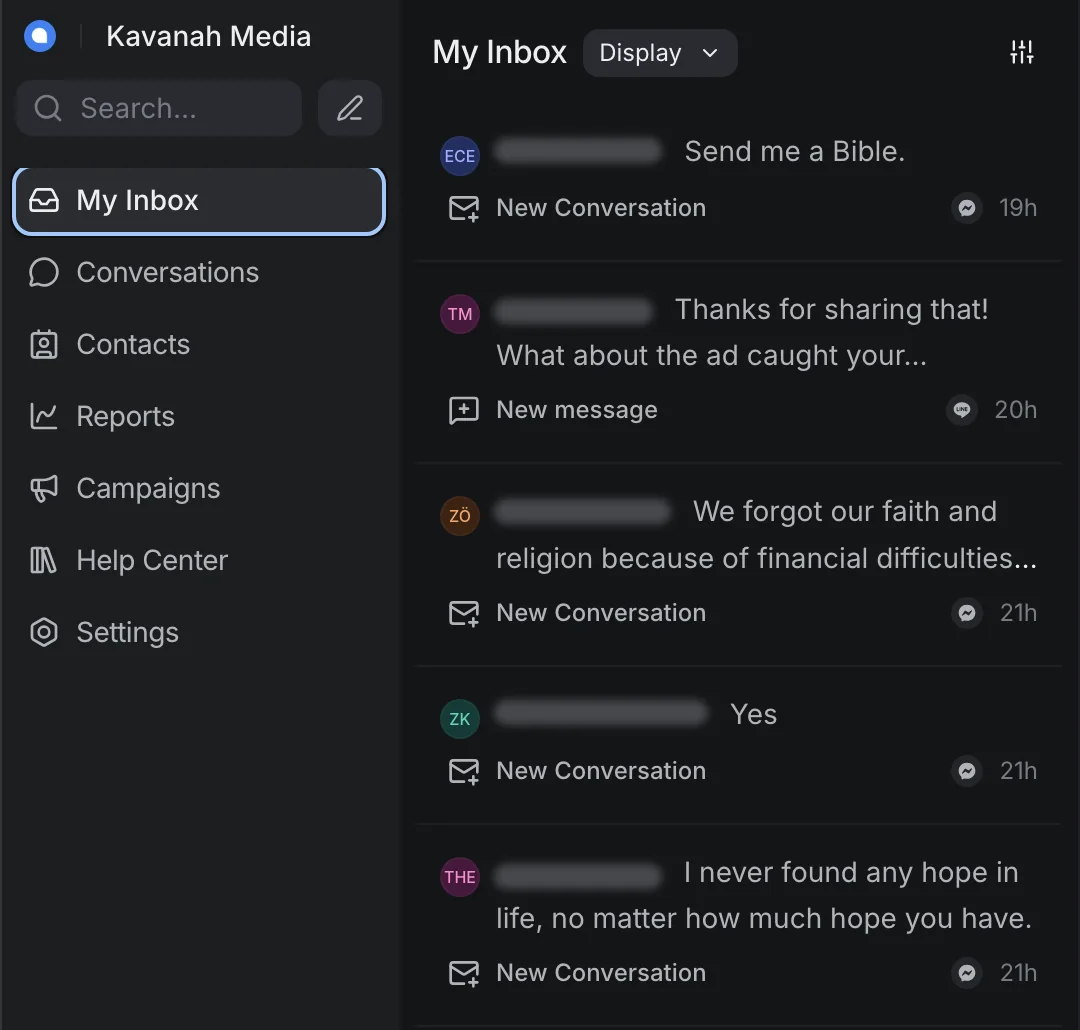
What it does
A help desk for the conversations your Pages, ads and website start — so a message becomes a contact your team follows up, not a notification nobody opened.
One shared inbox
Messenger, Instagram, website chat, email and every other channel you connect arrive in one list. Everyone on the team sees the same conversations and who is handling each one.
Assignment and teams
Assign a conversation to a person or a team, or let new conversations be assigned automatically. Nothing sits unanswered because everyone assumed someone else had it.
Private notes and labels
Leave a note on a conversation that only your team can see. Label conversations so you can find every prayer request or every follow-up later.
Saved replies and macros
Save the answers you give every week as canned responses. Macros and automation rules handle the routine steps, like labeling and assigning, in one click or none.
Contacts with their history
Each person gets a contact record with every conversation they’ve had with you and your team’s notes about them — so the next person to answer knows the story.
Answer from your phone
The Chatwoot apps for iOS and Android connect to your Kavanah Chat account, so a volunteer can reply away from a desk.
Who it’s for
Mission and ministry teams whose first contact with people is often a Messenger or Instagram message — answered by volunteers and part-time staff across time zones. Each team gets its own account.
Channels
Connect the channels your team already uses. Each one becomes an inbox inside your account.
Each of these needs an account or developer app set up with that platform first, and some charge per message: WhatsApp and SMS bill by conversation or text, X charges for API access, and TikTok messaging isn’t available in every region. Tell us which ones your team needs and we’ll set them up.
Connect Slack so your team is notified of new conversations and can reply from Slack. It works alongside your inboxes rather than as a channel your contacts write to.
Need something custom? The API channel and webhooks let you bring in messages from almost any other source — ask us.
Works with the rest of your stack
Conversations don’t have to stay in the inbox.
Disciple.Tools
Disciple.Tools has a Chatwoot plugin. Once your Disciple.Tools site is connected, a responder runs one action on a conversation and the contact and conversation are created in Disciple.Tools; new messages keep that record up to date. Talk to us before you set it up and we’ll go through it with you.
Kavanah Analytics
Kavanah Analytics imports your Kavanah Chat conversations and inbox reports through its Chatwoot connector, beside your Meta, Google and Disciple.Tools data — so you can see which ads and posts started real conversations.
Pricing
One flat price per team.
- Your team’s own Kavanah Chat account
- An inbox for every ready-to-connect channel above
- Hosted on AWS servers we manage and patch ourselves
- Attachments kept in private, encrypted storage
- Daily backups
- Sign in with email and password, or with Google
- Custom development work, such as integrations or connections built specially for your team
- Fees charged by channel providers, such as WhatsApp, SMS or X, which are billed separately
Mission organizations can ask about sponsored access. Online checkout isn’t built yet — request info and we’ll set up your team.
Questions
What do we need to connect our Facebook Page and Instagram?
Someone who is an admin of the Page, and of the Business portfolio it belongs to. In Kavanah Chat they go to Settings → Inboxes → Add Inbox → Facebook, click “Continue with Facebook”, and choose the Page. Instagram needs a professional account with message access turned on in the Instagram app. If that admin later changes their Facebook password or loses admin rights on the Page, replies stop until they reauthorize the inbox.
How long do we have to reply on Messenger?
24 hours from the person’s last message, which is Meta’s standard rule. Treat 24 hours as the limit.
Is our data shared with other teams?
No. Teams share our servers, but each team has its own account, and your inboxes, conversations and contacts are only visible inside it. Attachments are stored in private, encrypted storage, and the system is backed up daily.
How do we sign in?
With an email address and password, or with Google using the same email address. There is no public sign-up: we create your team’s account and you invite your team from there.
Why don’t we see Captain, SLA or audit logs?
Those are paid Chatwoot features that aren’t part of the open-source edition we run. We hide them so your team doesn’t click into upgrade screens for things that aren’t there.
Will you help us get set up?
Yes. We walk every new team through setup ourselves, and you can contact us any time something isn’t clear.
Want Kavanah Chat for your team?
Tell us about your team and the channels you use. We’ll say honestly whether it fits, and set up your account if it does.