One calendar for every channel your team posts to.
Write a post once, adjust it for each channel, preview it, and schedule it. The whole team works from the same calendar — and nobody has to hand around the Facebook password.
- Built on Postiz, open source
- Run on AWS servers we patch ourselves
- $20 a month per team
What it does
Organic posting for a team: plan it, write it, check it, and let it go out on time.
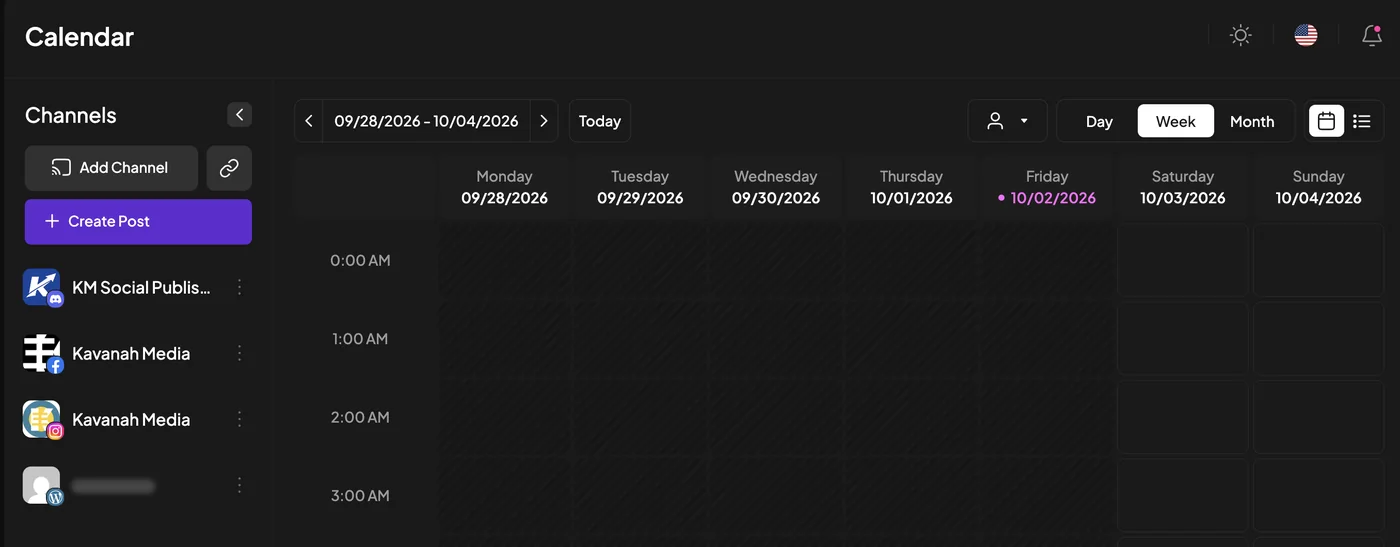
One shared calendar
Every scheduled post for every channel in one place, by day, week or month. Drag a post to move it. Anything that failed to publish is marked so someone can fix it.
Drafts
Save a post as a draft and come back to it. Drafts sit on the calendar, labelled as drafts, and never publish until someone schedules them.
Previews per channel
Write one version for every channel, or change the text for one of them. Preview the post before it goes, with each platform’s character limit checked for you.
Media library
Upload images and video once and pick them from the library for any post. Search by file name when the library grows.
Team roles
Admins connect accounts and invite people. Everyone else writes and schedules posts. The server enforces it — a hidden button isn’t the only thing standing in the way.
Preview links for review
Open a preview of any scheduled post and share the link. Teammates leave comments on it before it goes out.
Where it publishes
Facebook Pages and Instagram are what teams use it for today. The software supports more. Some channels need nothing from us; others need a developer app we register with that platform first.
Each of these needs its own developer app, some go through a platform review, and X now charges per post. Tell us which ones your team needs and we’ll set them up.
How a team works it
Four steps from an idea to a post on the Page.
Connect your accounts
A team admin signs in through each platform’s own login window and picks the Pages and accounts to add. We never ask for your passwords.
Draft
Anyone on the team writes the post, adds media from the library, picks the channels, previews it, and saves it as a draft or puts it on the calendar.
Review
Share the post’s preview link and let the team comment on it. Today review is something your team agrees to do. A required sign-off step, where a post waits for an admin, is planned but not built yet.
Scheduled publish
At the scheduled time the post goes out to each channel. A post written in more than one part publishes the rest as your own comments under the first. If anything fails, the calendar shows it.
Who it’s for
Small teams sharing a few accounts, where more than one person needs to post.
Ministry and mission teams
Several people posting to one Page, often from different countries. Each person has their own login, admins decide who can connect accounts, and the interface is available in 17 languages, including Simplified and Traditional Chinese.
Organizations with several ministries
Keep each ministry’s or project’s channels grouped together on the calendar, so the right post goes to the right accounts. Your team gets its own workspace, separate from every other team on the service.
Pricing
One price for the team, not per seat.
- Your own team workspace, set up by us, with invites sent to your people
- User and Admin roles, managed by your own admins
- Shared calendar, drafts, per-channel previews and media library
- Help connecting your Facebook Pages and Instagram accounts
- Hosting, updates and a daily off-server backup of your posts, schedule and uploaded media
- Custom development work, such as integrations or connections built specially for your team
- Fees charged by channel providers, such as X’s charges for posting through its API, which are billed separately
Mission organizations can ask about sponsored access.
Questions
Do you need our Facebook or Instagram password?
No. You connect a Facebook Page or Instagram account through Meta’s own login window, signed in as yourself. We never see your password and never ask you to paste a key or token into the app.
Does it post, reply or collect anything on its own?
No. It publishes only what someone on your team wrote and scheduled. It doesn’t scrape the platforms, doesn’t automate anyone else’s content, and doesn’t read other people’s comments. It creates posts; it never edits or deletes what’s already on your Page.
What kind of Instagram account do we need?
An Instagram professional account (Business or Creator) linked to a Facebook Page you manage. That link is how Instagram publishing works for tools like this one.
If we delete a post here, does it come down from Facebook?
No. Deleting a post in Kavanah Social removes it from your calendar only. To take a published post down, delete it on Facebook or Instagram as well.
Can we limit who sees which channels?
Not inside one team. Everyone in a team workspace can see that team’s channels; roles control who can connect accounts and invite people, not who can see them. If two groups need to be kept apart, give each its own team.
Is this Postiz?
Yes. It’s built on Postiz, an open-source scheduler (AGPL-3.0). We run our own version on AWS servers we manage, with changes for teams: real role enforcement, admin-managed invites and roles, and a Traditional Chinese interface. Under the AGPL, you can have the complete source code of the version we run: email privacy@kavanahanalytics.com and we’ll send it, free of charge.
Want your team on one calendar?
Online sign-up isn’t ready yet. Tell us about your team and the accounts you post to, and we’ll set up your workspace.
New to it? We’ll walk your team through setup — contact us.